Mastering Visual Communication with Multimedia Files Symbols Set
Every designer, content creator, or small business owner eventually hits a wall where text alone isn't enough. We need to convey complex actions, states, and file types instantly. You can describe a "pause" button in a paragraph, but it’s nowhere near as effective as a crisp, recognizable icon. This is where a robust visual language becomes essential. The Multimedia Files Symbols Set is a comprehensive toolkit designed to solve this exact problem, offering a cohesive collection of 20 vector graphics that bridge the gap between abstract concepts and clear user interface elements.
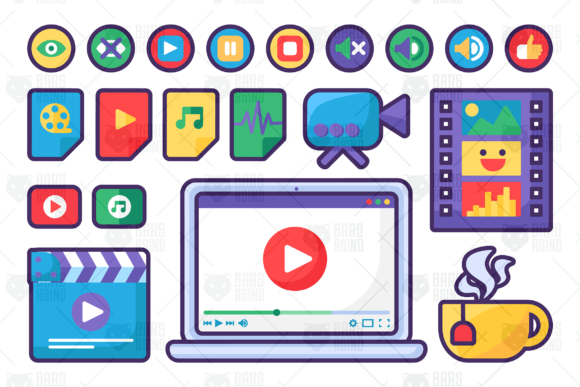
Imagine building a video editing tutorial, designing a media player interface, or creating an infographic about film production. You need icons that feel native to the environment. This set provides exactly that: a curated library ranging from the functional (play, stop, volume control) to the contextual (clapperboards, filmstrips, video files). It’s not just a random assortment; it’s a visual ecosystem. The style leans toward a clean, line-art aesthetic that feels modern and professional without being cold. It strikes a balance between the minimalism required for digital interfaces and the distinctiveness needed for branding materials.
A Visual Toolkit for the Modern Creator
The strength of the Multimedia Files Symbols Set lies in its versatility. It doesn't just cater to one niche; it speaks the dialect of several creative professions. For the videographer or motion designer, the set includes essential tools of the trade: a video camera, a laptop displaying an editing timeline, and the ubiquitous clapperboard. These aren't just decorative; they are functional shorthand for an entire workflow.
For the marketing manager or blogger, the set offers symbols that enhance user experience. The "open eye" and "closed eye" are perfect for toggling visibility states in forms or dashboards. The "like" or "favorite" sign is a universal call to action on social platforms. Then there are the media file icons—the cinema file, music file, audio file—that are indispensable for websites hosting digital downloads or streaming services. These assets help users navigate content quickly, reducing cognitive load and improving site usability.
The inclusion of a "cup with hot coffee or tea" might seem like a small detail, but it adds a layer of personality and human touch. It suggests a workspace, a moment of pause, or the "home movie" vibe. It’s these subtle elements that allow a brand to feel relatable. When you use these symbols in a presentation or a social media post, you're not just displaying a function; you're suggesting a lifestyle or a creative process. This elevates the design from a mere utility to a piece of visual storytelling.
Practical Applications: From Digital Interfaces to Print Media
Where does this set fit into your projects? The applications are surprisingly broad. In web design, these icons are perfect for custom video players, podcast landing pages, or digital asset management dashboards. Instead of relying on generic browser defaults, you can implement a cohesive icon set that matches your brand identity. The stroke-based nature of the icons means they scale beautifully, maintaining their integrity whether used as small UI elements or large hero graphics.
For editorial design and publishing, think about magazines or blogs covering film, music, or digital entertainment. These symbols can serve as dividers, bullet points, or illustrative elements next to articles. A "filmstrip" icon next to a movie review or a "sound wave" next to a music feature instantly signals the topic to the reader. In packaging design for software or media products, the icons can be used to denote system requirements or file compatibility, providing a professional and polished look to the box or sleeve.
Even in social media graphics, these assets shine. Creating a quick tutorial on Instagram? Use the play, pause, and stop icons to guide the viewer through steps. Designing a thumbnail for a YouTube video? The video camera or clapperboard icon can add context without cluttering the image. The set is designed to be a workhorse, adapting to both large-scale commercial projects and smaller, personal creative endeavors.
Integrating the Set into Your Design Workflow
Adopting a new set of design assets requires a bit of strategy. First, consider the visual hierarchy of your project. These symbols are designed with a consistent stroke weight and style, which is a massive advantage. It ensures that when you use multiple icons together, they look like they belong to the same family. This consistency is crucial for maintaining a professional appearance across all touchpoints of a brand.
Next, think about font pairing. While this is a symbol set rather than a typeface, it interacts with your typography. A clean, modern sans-serif font often pairs well with line-art icons, creating a harmonious and legible layout. If your brand uses a more expressive script or handwritten font, the icons can provide a grounded, functional counterpoint. Test the icons alongside your chosen typefaces to ensure they complement each other in weight and scale.
Finally, pay attention to the technical details. The set includes an AI CS6 file with editable strokes, which is a significant benefit for designers who need to customize. You can adjust the stroke weight to match your existing design system, change colors to fit your brand palette, or even modify the shapes slightly. This level of control transforms the set from a static collection into a flexible design tool. Always check the licensing for your specific use case—whether it's for a client project, a commercial product, or personal use—to ensure you're covered.
In a world saturated with information, clarity is currency. The Multimedia Files Symbols Set provides a reliable, professional, and versatile way to communicate complex ideas simply. It’s more than just a collection of clipart; it’s a visual vocabulary for the digital age, ready to enhance your next project with intuitive and engaging graphics.